Every measurement started with a code change.
Tags are the connective tissue between a brand's website and Google's ad products. Every conversion tracked, every audience built, every analytics insight starts with a tag, a small piece of JavaScript placed on a page. But placing, managing, and verifying tags had always required developer involvement.
For most advertisers, that meant a slow, fragmented process: submit a ticket, wait for dev resources, hope the tag fires correctly, and have no real way to confirm it did. The people who needed measurement (marketers, media buyers, campaign managers) were entirely dependent on people who didn't think about measurement in the same terms.
"The data gap wasn't a data problem. It was an access problem. Measurement was only as good as the last developer who touched the code."
Compounding this: Google's products had grown independently. Google Analytics had its own tagging setup. Google Ads had its own. DV360 had its own. Each with a different UI, different vocabulary, different mental model. Each ultimately wanted the same thing from a user's site.
Three products. One tagging story.
The work spanned three interconnected areas, each addressing a different layer of the tagging problem. Together they formed a platform, not just a feature set.
The core architectural shift: from per-product tag fragments to a single unified tag with product connections managed in UI
Google Tag
The centrepiece of the platform. The One Google Tag initiative replaced the fragmented per-product tag setup with a single Google Tag that could connect to any Google product. The design challenge was making this accessible to a marketer who'd never written a line of code — while still meeting the needs of enterprise teams managing dozens of properties.
The key interaction was tag discovery: rather than forcing users to add new code to their site, the Google Tag showed them what was already there and let them connect to it. This required designing for a state most UIs ignore — "your tag exists, but it isn't connected yet."
The tag discovery state: showing an existing tag and the products available to connect to it without new code
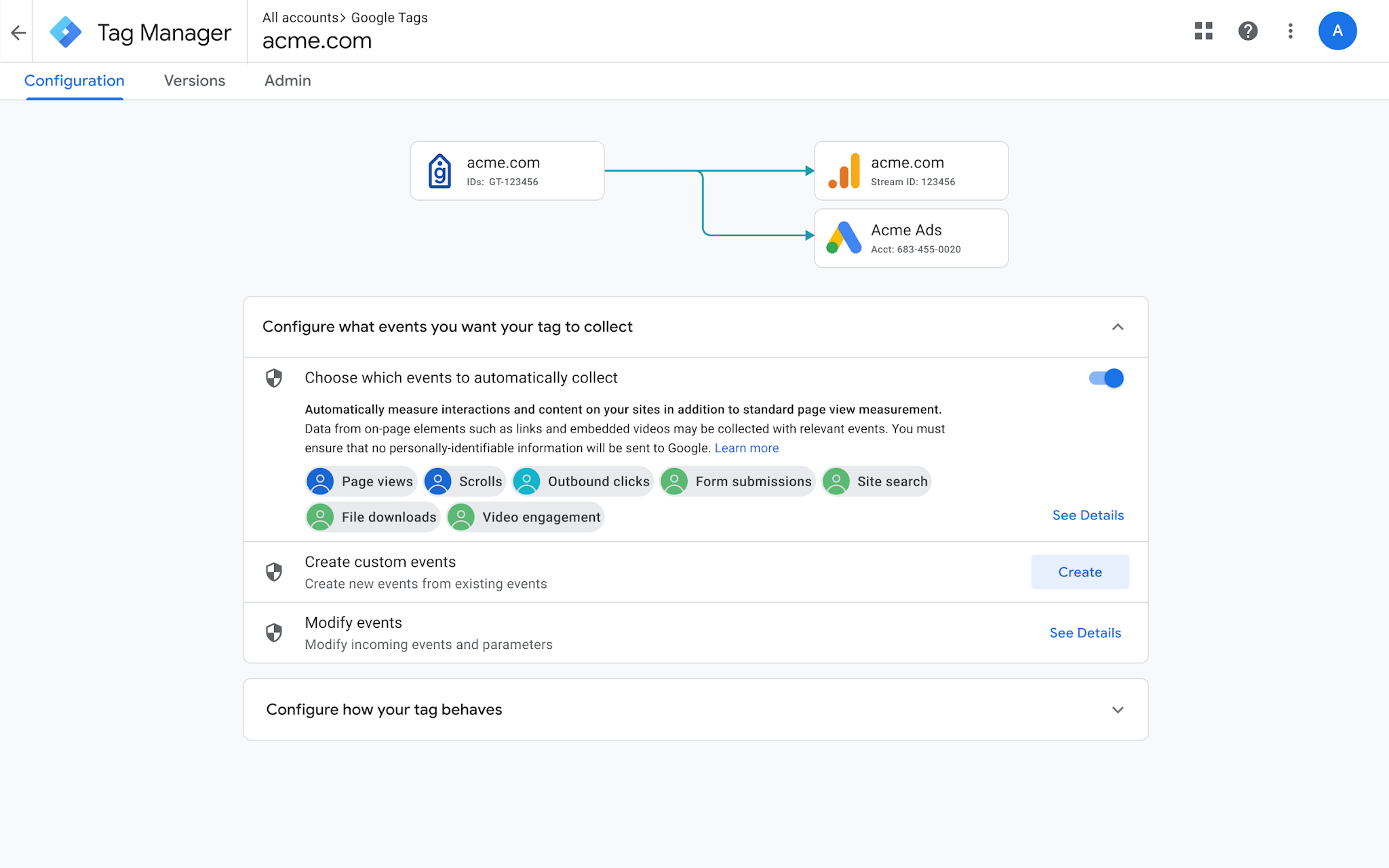
Google Tag Manager
Tag Manager is where power users manage their full tag ecosystem — rules, triggers, variables, and versions across multiple properties. My work here focused on bringing the Google Tag's paradigm into Tag Manager's more advanced context: making the platform coherent for users who move between both.
This required close alignment with the Google Analytics and Ads teams to ensure that actions taken in Tag Manager were reflected accurately in product UIs, and vice versa. The biggest design challenge was not creating a third mental model in a space that already had two.
Conversion testing
Recurring support requests from advertisers
I just wanted to ask if there was a way we could check if the unverified conversions are implemented correctly on the client's site.
Top 10% advertiser, via supportOur team replaced the old tag with the new gTag. Could you please check if it's working?
Via supportWould we be able to help test and validate their prospect conversion? We'd like to rule out whether there are any pixel issues.
Via supportI just wanted to check if their conversion tracking is set up correctly. Could you do that check?
Via supportEven with tags in place, advertisers had no reliable way to know if those tags were actually sending the right data. A misconfigured conversion action could silently waste budget for weeks without any signal that something was wrong. Conversion testing gave advertisers a way to see their data before it mattered — triggering real tag events in a test environment and surfacing what was actually being received.
The design goal was confidence, not debugging. The primary user wasn't a developer running diagnostics — it was a marketer who needed to answer a single question: "Is my conversion tracking working?"
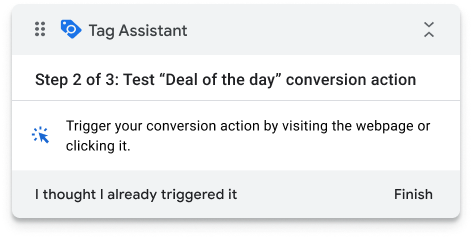
The Tag Assistant widget — step-by-step guidance, on any site, without touching code

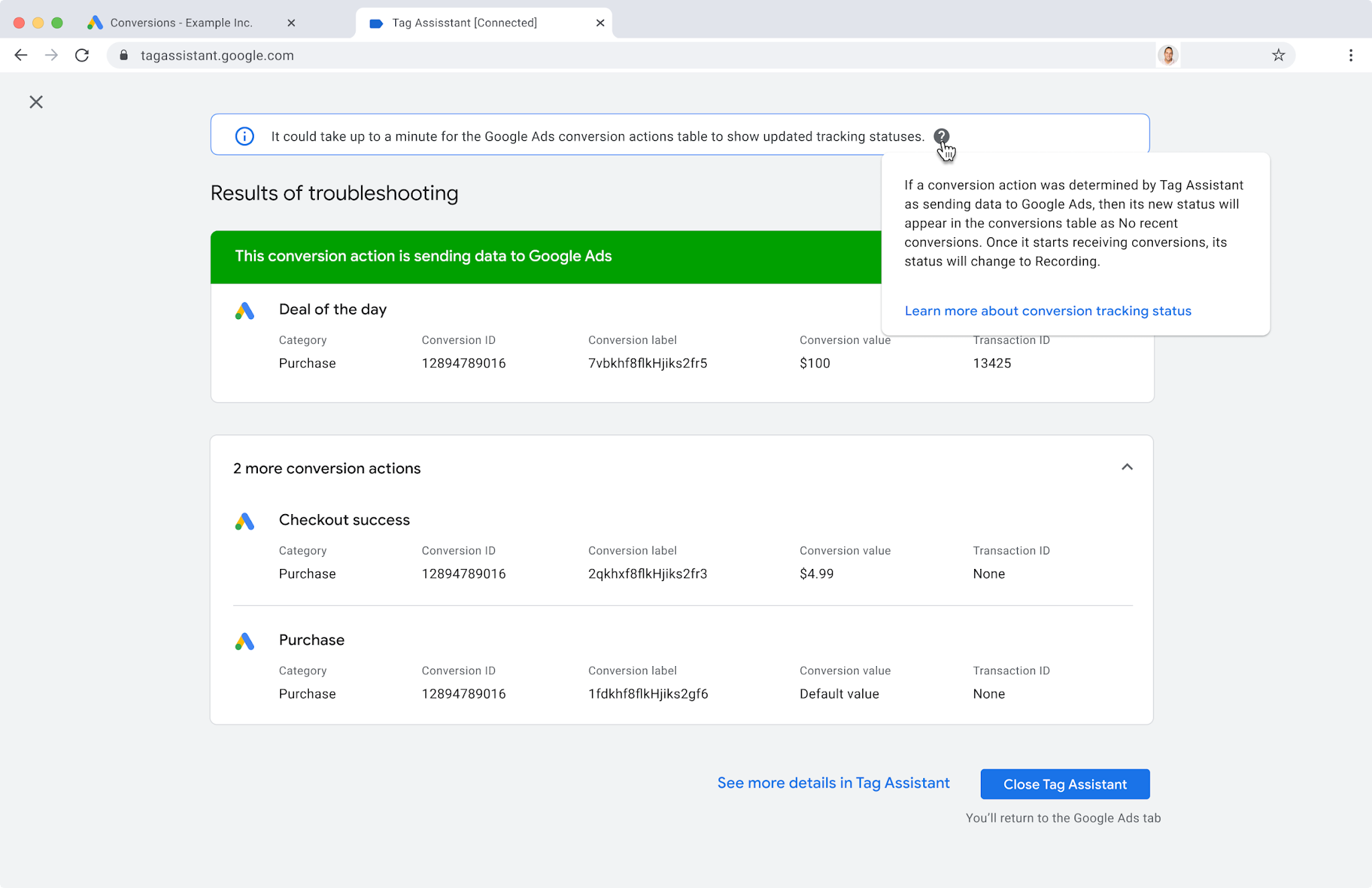
Left: the widget on the advertiser's own site during a live test. Right: confirmation the conversion fired correctly.
What made this genuinely difficult
Tagging infrastructure touches every Google advertising and analytics product. That made the design problems as much organizational as they were product design challenges.
Problem 1: Cross-product alignment without a shared owner
Google Ads, Google Analytics, and DV360 sit in separate product organisations, with separate engineering teams, separate design systems (each interpreting Material Design differently), and separate product roadmaps. There was no single team that owned the tagging experience end to end.
Getting three orgs to agree on a shared mental model — what a "tag" is, what "connected" means, what state transitions are valid — required sustained alignment work that went well beyond design. I spent as much time in cross-functional working sessions as in Figma. Every shared vocabulary decision had downstream UI implications that affected multiple teams.
Product orgs
Each with independent roadmaps, engineering constraints, and existing tag UI patterns to unify.
Design systems
Material Design plus Google's internal enterprise subsystems — overlapping specs, conflicting component behaviours.
Mental model
The goal: one shared definition of what tagging means across all products and user types.
Problem 2: Years of technical debt with no clean seam
Google's tagging infrastructure had been built incrementally over many years. What looked like a UI problem often turned out to be a data model problem, a naming problem, or an API limitation that had been worked around so many times the workaround had become the standard.
Designing around legacy constraints without exposing them to users required a level of engineering collaboration that most design work doesn't demand. I had to understand the technical topology well enough to know which constraints were real, which were negotiable, and which needed to be excluded from v1 scope to ship anything coherent.
Working framework — identifying the design space within what the infrastructure could actually support at launch. Cells marked "Excluded v1" were real but documented deferrals, not gaps.
How I led this work
At a glance
I was the IC design lead across all three areas of the tagging platform. This wasn't a single product team — it was a cross-org initiative, which meant I was designing within multiple product contexts simultaneously while trying to maintain a coherent platform vision across all of them.
Establishing the platform frame. Early in the work, each product area had its own conception of what "improving tagging" meant. I led the framing work that recast these as a single connected problem, and used that frame to build alignment with PMs and engineering leads across orgs who had previously been solving in parallel without coordination.
Navigating Material Design and enterprise constraints. Google's design systems are extensive, but enterprise use cases consistently pushed against their boundaries. I worked closely with the Material and enterprise subsystems teams to identify where existing components served our needs, where they needed extension, and where we needed to advocate for net-new patterns.
Translating between user types. The tagging platform had to work for a marketer setting up Google Analytics for the first time and for an enterprise tag manager overseeing hundreds of properties. I developed a tiered mental model for the platform that let us design for both without building two products.
Representing design in technical conversations. Tag infrastructure decisions had direct UX consequences — often more than engineering anticipated. I maintained enough technical fluency to participate in architecture conversations and flag UX risks before they became design problems with no good solution.
Working artefact from cross-org alignment sessions — establishing the shared vocabulary that let three independent product teams design against a single tag state model
Measurement confidence at scale.
The most direct measure of value came from conversion testing. Before the tool existed, misconfigured conversion actions were silent — advertisers had no way to know their tags were wrong until they noticed their data didn't look right, which often took weeks.
Beyond the headline number, Google Tag adoption simplified the onboarding experience for new advertisers across Google Analytics and Ads — reducing the developer dependency that had been a consistent friction point in advertiser research. Marketers who previously needed to route tag requests through engineering could now connect products themselves.
For the broader organisation, the platform work established a shared tagging vocabulary across three previously independent product orgs, a structural change with implications beyond this initiative.
What I'd do differently
We underestimated how much the technical complexity would leak into the UX, even after we'd done the work to abstract it. Users who encountered edge cases — partially configured tags, conflicting product connections — hit moments where our clean mental model broke down. I'd invest more time earlier in failure states and edge case design, not as an afterthought but as a core part of the interaction model.
I'd also push harder earlier for a dedicated user research track on the enterprise segment specifically. SMB behaviour was better understood; enterprise tag managers had needs and mental models that we learned through iteration rather than upfront. That cost us revision cycles that earlier research would have prevented.
"Cross-org design at Google taught me that the most durable decisions start with finding the problems everyone shares, and solving them together."